Did you know there is a type of image that cannot be included in a webpage using the img element? SVG (short for Scalar Vector Graphics, which is an XML-based markup language like XHTML) images work so differently from most image formats that the normal method of including images in a webpage (via the img element) doesn't work. The img element is equally insufficient for Flash files and Java applets. These files need a little extra something.
Enter the object element, a more complex and versatile element designed to handle more complex data. These include:
- Flash animations,
- Webpages,
- Movie files like
.mpeg and .mov,
- Images such as
.png and .jpg *,
- Java applets (which are programs embedded in the page),
and any other media supported by a computer.
Note: *Internet Explorer does not support this method of including images.
Object Elements
Each object requires one object element, plus the option of one or more child parameter elements.
The Object Element
Class Name: object
Implied Attributes
- data
- This contains the URI of the file you want to include. In other words, it works exactly the same as the
src attribute of an img element.
- type
- Since the
object element can be used for a lot of different datatypes, this lets the browser know what it's including. Possible values are:
- application/x-shockwave-flash
- Flash animations (I think this is the most common one).
- image/png
- image/jpg
- image/gif
- Image files. Their respective extensions are:
- text/html
- image/svg+xml
- text/xml
- Webpages and other markup documents. (Yes, SVG images are actually markup documents, which is why they can't be embedded with the
img element.)
- application/pdf
- A PDF file.
- video/x-ms-wmv
- video/quicktime
- For movie files (Windows Media and Quicktime, respectively)
- application/x-java-applet
- Java Applets
There are many other values for this as well, but if I attempted a comprehensive list, we'd be here all day.
- usemap
- Under certain circumstances, the
object element can use image maps, just like an img element.
- standby
- This attribute contains plain text. The text is an message to be displayed while the object is loading.
- tabindex
- This works like the
tabindex attribute used in the a element.
Where Object Elements Go
The object element is one of two elements (the other is script, which I'll get to later) that can be nested both in the head and body elements. Nesting it in the head is not all that common; and its contents may show up on the webpage (there are ways of hiding it, but that's in the section on CSS.
If object is a descendent of the body element, it must be the descendant of a block-level element such as p or div.
The Object Parameter Element
Class Name: param
A parameter is to an object what an attribute is to an element: It controls a property of the embedded object. Unlike attributes, however, what is contained in the param element means nothing to the browser; it is interpreted by the embedded object instead.
The param element is an empty element. It has no end tag.
Required Attributes
- name
- This is the name of the parameter you want to control. To use this properly, you have to know the object you're trying to control.
Implied Attributes
- value
- This is the value passed on to the embedded object. What the embedded object does with it is decided by the
name attribute.
- id
- Assigns a unique identity to the
param element.
Forbidden Attributes
The param element does not use any language or core attributes except for id (mentioned above).
Do note that whether or not the contents of the name and value attributes are case-sensitive—in other words, a capital letter is treated as being distinct from a small letter—depends on what you're embedding. It's safest to assume that the values are case-sensitive.
Demonstrating Objects
Since objects are such a versatile element, I'll use more than one demonstration.
Embedding a Webpage
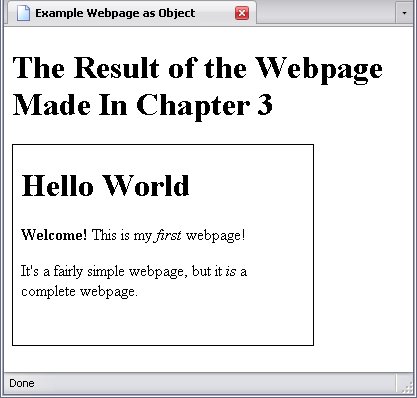
The first one is simple: I'm embedding a webpage inside another webpage. This particular embed requires no param elements.
<div>
<object type="text/html" style="width:300px; height:200px; border:1px solid black;" data="../../first_webpage.html"></object>
</div>
What appears inside the border is the embedded webpage, and the result can be seen below:
By the way, make sure the object element has the correct size and width; otherwise its default size could force your viewers to scroll within the object to see its contents.
Embedding SVG Images
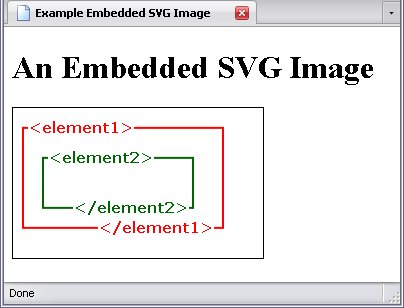
Embedding an SVG image works practically the same. I'll embed a graphic used in Chapter 2, which was originally created as such a graphic. All I did here was change the data attribute.
<div>
<object type="text/html" style="width:300px; height:200px; border:1px solid black;" data="../../svg_image.svg"></object>
</div>
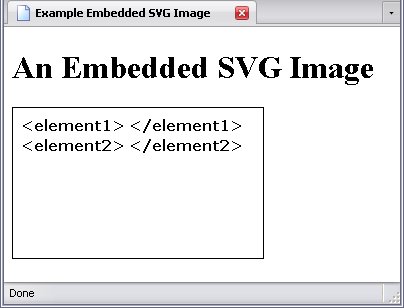
And the result is not what we want. The reason is I didn't change the attribute, and the browser is reading the file incorrectly.
The type attribute for an SVG image is image/svg+xml
, which tells the browser how to read it.
<div>
<object type="image/svg+xml" style="width:300px; height:200px; border:1px solid black;" data="../../svg_image.svg"></object>
</div>
And there we go.
Now, you might be wondering why the object element isn't considered empty here, as so far it has had no content beyond its attributes.
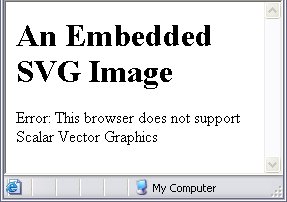
Well, an empty element isn't just an element that has all its information in it's start tag; it's one that has all possible information in the start tag, and the object element may (and usually does) have content outside the start tag. For example, if a browser does not, for example, support SVG, I can leave a note inside that object warning of that:
<div>
<object type="image/svg+xml" style="width:300px; height:200px; border:1px solid black;" data="../../svg_image.svg">Error: This browser does not support Scalar Vector Graphics</object>
</div>
What happens is if the browser can't figure out how to handle the object, it will look at the object element's contents to look for something — anything — it can work with. And while Internet Explorer cannot render SVG, it can certainly render text. Meanwhile, a browser that can render SVG will render it, look for any relevant param elements, and move on. Therefore, this will cause no change whatsoever to what browsers that can display the image show, but Internet Explorer, which doesn't support SVG, will show the error text.
By the way, let this be a lesson to you: Just because a web technology is new and shiny doesn't mean you should use it. Not everyone will be able to support it just yet.
Embedding Flash Animations
Probably the most common use of the object element is to embed Flash on the webpage. This is where things get complicated and you have to ask all browsers to play nice—which can be a trick.
The value for the type attribute is application/x-shockwave-flash
.
It is here that browser quirks really become a pain. For most browsers, the following code is sufficient:
<div>
<object type="application/x-shockwave-flash" style="height:50px; width:185px; border:1px solid black;" data="../../flash.swf"></object>
</div>
For Internet Explorer, it's not. This is where the param element becomes really important: Internet Explorer needs a movie
parameter to know what movie is playing.
(Updated For Internet Explorer)
<div>
<object type="application/x-shockwave-flash" style="height:50px; width:185px; border:1px solid black;" data="../../flash.swf">
<param name="movie" value="../../flash.swf">
</object>
</div>
And now we have our flash animation properly embedded (In the actual animation, the circle simply travels from left to right):
For those with notions of mischief, yes, you can set this up so that Firefox, Opera and the like play one movie, and Internet Explorer plays something else—in other words, it's possible to Rickroll IE.
Of course, we can set other parameters as well for Flash animations:
- quality
- Quality refers to the resolution of the animation. There are three possible values:
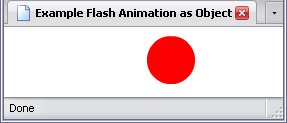
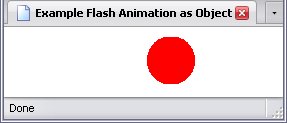
High quality means that the picture looks very smooth but requires more processing by your computer, while low quality means that while your computer doesn't have to work as hard, the picture is more pixellated (i.e. it looks
rougher
).
- High Quality:
- Low Quality:
- loop
- What happens when the animation is finished? Does it repeat itself or stop? If the loop parameter is not specified, the animation plays as a loop (i.e. repeats itself). When specified, it is false unless
value is set to yes
or true
.
- play
- This determines whether or not the animation plays automatically. Again, values are
true
and false
.
Other Media
Embedded Java programs, video files, and so on get really complicated and are beyond the scope of this book. But suffice to say, the object element will do for nearly any medium you wish to embed.