The best way to describe a variable is to compare it to a box with a name written on it. You use a variable to store a value, like you use a box to store an object (although in this case, the box would have the capacity for only one object). Throughout the chapter, I will use a variable named foo. I mentioned it's a common dummy variable name when I described the var element back in Inline Elements, so I may as well use it.
A variable can hold values such as:
- a number, such as 5,
- a string of text (known as a string) such as
Something else
,
- a boolean value (a value that is either
true or false),
- a reference to a DOM node, such as the document node
or other types of values.
The most important and fundamental fact about variables is , much like you can take an item out of a box and put in another. The value of 5
will always be 5
, and document
will always refer to the document node. The value of a variable is whatever you set it to be.
Declaring A Variable
Declaring a variable means creating a variable and giving it a name. Variables are declared using the keyword var (yes, the same as the (X)HTML element name). While the keyword var may be omitted, some browsers could get confused, so its best to use it whenever declaring one.
The semicolon at the end is an optional character marking the end of the line. It's optional, but I usually include it.
What we have done here in this script so far is said a variable called foo exists in this script.
Variable Names
Variable names can be a combination of letters, numbers, underscores (_
), and dollar signs ($
). In fact, a lot of programmers place dollar signs in front their variables' names to indicate that they are indeed variables. However, variable names must not start with a number.
Values
A variable is useless until it stands for something. Otherwise it's like an empty box that takes up room. Assigning a value to a variable requires an operator, which is basically a special symbol or sequence of symbols that tells the script to do something. The operator in this case is, appropriately enough, =
—the equals sign. So, let's put the variable foo to work:
What this says is There is a variable called foo. foo holds the value 5
. You can assign a value when declaring a variable, too:
What this says is There is a variable called foo, which holds the value 5
. It's a subtle distinction, but the distinction is there.
No matter what the value type, the means of assignation are the same:
var foo = "Something else";
var foo = true;
var foo = document;
Assigning Nodes
When you assign a node to a variable, you actually assign that variable a reference to the node. Through that reference, you may access or control all parts of the node.
In the following experiment, we want access to the text node contained in an span element with the ID JS
. Below is the HTML code of the page:
<!DOCTYPE html PUBLIC "-//W3C//DTD HTML 4.01//EN" "http://www.w3.org/TR/html4/strict.dtd">
<html>
<head>
<meta http-equiv="Content-Type" content="text/html; charset=utf-8">
<meta http-equiv="Content-Style-Type" content="text/css">
<meta http-equiv="Content-Script-Type" content="text/javascript">
<title>Changing Text</title>
</head>
<body>
<p><strong>JavaScript result:</strong> <span id="JS">The text node we want</span></p>
<script type="text/javascript">
</script>
</body>
</html>
This contains several nodes that can be referenced through variables. Below is the JavaScript that will allow us to access the text node through the variable foo and assign its text to the variable text:
var foo = document;
var text = foo.getElementById("JS").firstChild.data;
var foo = document.getElementById("JS");
var text = foo.firstChild.data;
var foo = document.getElementById("JS").firstChild;
var text = foo.data;
If I got any more specific with the contents of foo, the value wouldn't be a reference to any sort of DOM node, but rather a string of text stating, The text node we want
.
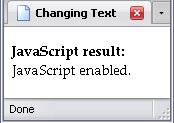
By the way, you can use the text node reference assigned to foo to change the text:
var foo = document.getElementById("JS").firstChild;
var text = "JavaScript enabled.";
foo.data = text;
And, so long as your JavaScript is turned on, it works!
Arrays
An array is an object that:
- holds multiple values,
- has methods of retrieving the value that you want,
- and has methods of obtaining information about the array.
If a variable is like a box, an array is like a box with dividers in it. Each spot outlined by the box and dividers would be known as an element (not to be confused with the element of a markup language). Declaring an array takes some special coding.
If you're just declaring an array, you can do it like this:
If you want to declare an array and say how how many elements it should have (for example, 3), you can do it like this:
Lastly, if you want to specify the actual values that the array holds while declaring it, you can do that too. There are two ways:
var foo = new Array(5, 3, "Something else");
var foo = [5, 3, "Something else"];
There is a difference you should know about: var foo = new Array(5);var foo = [5];5
.
Assigning Values To An Array
If foo is an array, you should not say foo = 5;. It will set the variable foo to the value 5
, and you can kiss the array goodbye. If you want to put the value into the array foo, you have to tell the script where to stick it. Where in the array, I mean.
The first thing you need to know is that element #1 will be the second element in the array—arrays always start at 0. So to reference the first element in foo, you write the name of the array (in this case, foo, followed with the number 0 in square brackets: foo[0]. So, here is how to assign the values 5
, 3
, and Something else
to the first three elements in the array foo:
foo[0] = 5;
foo[1] = 3;
foo[2] = "Something else";
Now foo holds three different values. Note that I don't use the keyword var here—foo already exists.
Arrays Within Arrays
Arrays can actually hold other arrays, as well. Say I decide to declare foo like this:
var foo = new Array(new Array(5, 3), "Something else");
var foo = [[5, 3], "Something else"];
In each case, I have an array inside an array. If I wanted to reference the value 5
, I would use foo like an array, then the element 0 of foo like an array as well. Element 0 of that is where 5
is, so I would reference it like this: foo[0][0]. The value 3
is foo[0][1], but Something else
is foo[1], since it is in the array foo itself. But what if I declared foo like this?
var foo = new Array(new Array(5, 3), new Array("Something else"));
var foo = [[5, 3], ["Something else"]];
Then Something else
would be in foo[1][0], since it is now in a one-element array which is itself in the array foo.
And, yes, you can assign an array to an array element just like any other value:
var foo = new Array(2);
foo[0] = [5, 3];
foo[1] = new Array("Something else");
Working With An Array
There are several things you can do with the array. In all cases, I will assume that the name of the array is foo.
- x = foo.
length
- The value of x is now the number of elements in the array foo
- x = foo.
concat(array1)
- The value of x is now an array containing the elements of foo followed by the elements of array1 (foo and array1 are unchanged). You have the option of doing this with more arrays at once:
x = foo.concat(array1, array2, array3 . . . )
- x = foo.
pop()
- The last element of the array foo is removed, and becomes the value of x.
- foo.
push(x)
- The array foo adds an element to its end, which holds the value of x.
- foo.
reverse()
- The elements in array foo are reversed.
- x = foo.
shift()
- The first element of the array foo is removed, and becomes the value of x.
- foo.
unshift(x)
- The array foo adds an element to the beginning, which holds the value of x, and the indices of the following elements are all raised by 1.
Arrays Vs. Element Node Lists
In The Document Object Model, I mentioned that getElementsByTagName and childNodes got you a whole list of nodes which seemed to work like arrays. However, they are not arrays. While you can get the length of a node list, you cannot manipulate node lists like you can arrays. They are what they are, and fiddling around with them takes quite a bit more work. I'll explain how to do it in DOM Manipulation.
The Index of an Array
Ultimately, the index of an array must be an integer (there are what look like exceptions; I'll get to those later). However, what goes between [
and ]
does not have to initially be an integer. It can alse be:
- an integer stored in a variable,
- an integer calculated through a procedure,
- an integer stored in an element of an array (it can even be the same array),
- an value stored in a text node converted to an integer,
- an integer calculated from an equation. (foo[1 + 1] will get the third element of foo),
or even a mix of the above.
Changing The Value Of A Variable
As stated before, the value of a variable can change. How you can change it depends on what kind of value the variable holds.
The simplest way to change the value of a variable is by simply assigning a new value:
foo = 5;
foo = 3;
foo = "Something else";
Line by line, the above code says:
foo holds the value 5.
foo holds the value 3.
foo holds the value Something else
.
In every case, the variable name remains foo, but the value changes.